
Behind the scenesDigitalPersonal brandingProjects
Built for an audience of one, ready for the world
If you’ve read anything on this site before, you probably know two things about me:
- I love building things of all kinds.
- I have a bit of a thing for technology.
This goes way back. In 2011, I even made it to the Canada-Wide Science Fair with SaveMySites, a website that let you save your bookmarks and access them from any device. As mundane as that sounds today, it was a month before Steve Jobs unveiled iCloud. (Proof: this lovely Radio-Canada archive news report, in French. Skip to 1:17 if you want to see me thoroughly embarrassed.)
Building this personal site rekindled a long-dormant passion of mine: making things with technology. I dove back into my distant web development knowledge... and, thanks to AI, I was able to go much further. That little experiment left me wanting more. So I took a look at my (many) open tabs, hunting for ideas for tools I could build for myself. After all, I spend my days in those tabs, and I usually have opinions about the tools I use.
So today, I’m introducing my first babies. Don’t go thinking they’re perfect or fully polished. But that’s kind of the point: put something out into the world and keep pushing it further over the coming weeks, months, maybe even years.
Dashtabs: One page. Your whole day.
The idea started with a certain nostalgia for Netvibes and iGoogle, the services of my youth where you could build a dashboard out of widgets and have one central source of information.
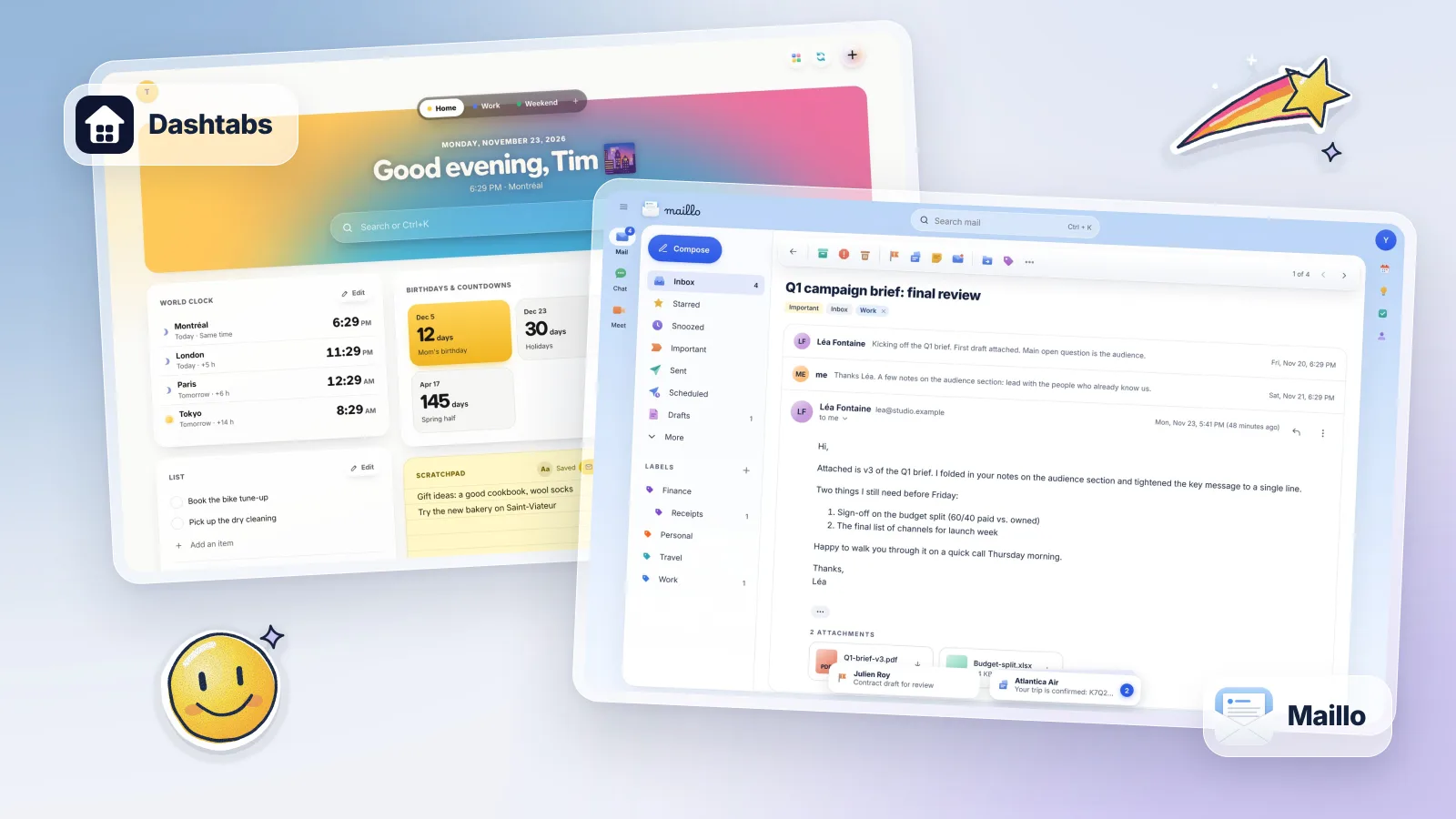
I wanted a homepage all my own, bringing together my emails, calendars, files, workouts and more at a glance. It started as a private page on this site, and I’m now turning it into a service other people can use. Meet Dashtabs.
In a nutshell: Dashtabs gives you dashboard tabs where you can add widgets, say, to check your calendar or see the status of the metro. Over time, I’ve added all sorts of features with the help of Claude, Anthropic’s AI: a “calm” mode that strips away every distraction, a Chrome extension and a quick search. I keep coming up with widget ideas that I add regularly. The latest: a running-shoe wear tracker, so I know when mine are due for replacement (hint: it’s right now, which is exactly what gave me the idea).
It’s a small personal project that I’m slowly opening up to others, because after several weeks of use, I genuinely think it can be useful. Most of Dashtabs’ features are completely free: the only ones behind the Premium plan are those that cost me money to run (for example, sending a summary of your day every morning).
Today, Dashtabs is almost ready to welcome its first outside users. Its showcase site is already live, and anyone interested can join the waitlist to be among the first in.
Maillo: A brand-new face for Gmail
Fair warning: while Dashtabs is a web app pretty much anyone can use, Maillo requires a bit more technical know-how.
Maillo starts from a simple observation: Gmail is a powerful email service, but I’ve always found its interface ugly. So I set out to build it a new front end that’s easier on the eyes. And while I was at it, to add other features, some original and some borrowed from other email apps, to round it all out. For example: a stack of emails set aside for quick reference, and another for emails that need action from you. Or the ability to add a private note to an email, whether it’s a reminder about context or just the confirmation number for a bill you paid.
Because Maillo needs access to your Gmail account, I didn’t want to take any security risks. So it isn’t a service you sign up for and create an account on. It’s an open-source app you download and install with your own hosting provider. That way, your emails never go through my servers. It’s technical, but not infinitely complicated.
If you don’t have the desire or the know-how to set it up yourself, you can still try the online demo, just to see what my latest baby can do.
What I learned along the way
It goes without saying that I won’t become a millionaire with these. But building them, and now slowly opening them to the public, has taught me a ton. A few examples:
- Curiosity and a certain level of knowledge help steer AI in better directions. Claude’s first suggestions were rarely optimal, on several levels. I often had to push back on a user experience that felt off, or insist on adding a caching system to improve performance.
- There’s a world of difference between hacking together a basic solution that meets your own needs and opening it up to more people, with everything that implies. I vastly underestimated this one. It’s why Dashtabs has a waitlist today!
- There are a lot of boring parts: hosting, cache optimization, OAuth verifications, deploying to staging and then to production. Small details take far more work than I ever expected.
Try them, you’ll love them (maybe)
Starting today, you can join the Dashtabs waitlist or, if you’re feeling brave, take on setting up Maillo on your own server. For my part, Dashtabs has been part of my daily routine for a few weeks now, and Maillo has been slowly winning my heart over the past few days. I love it a little more with every new deployment.
If you try them, I’d love to hear what you think: your feedback will shape what comes next. Click the buttons above to explore them in more detail, or subscribe to the newsletter to stay in the loop.