
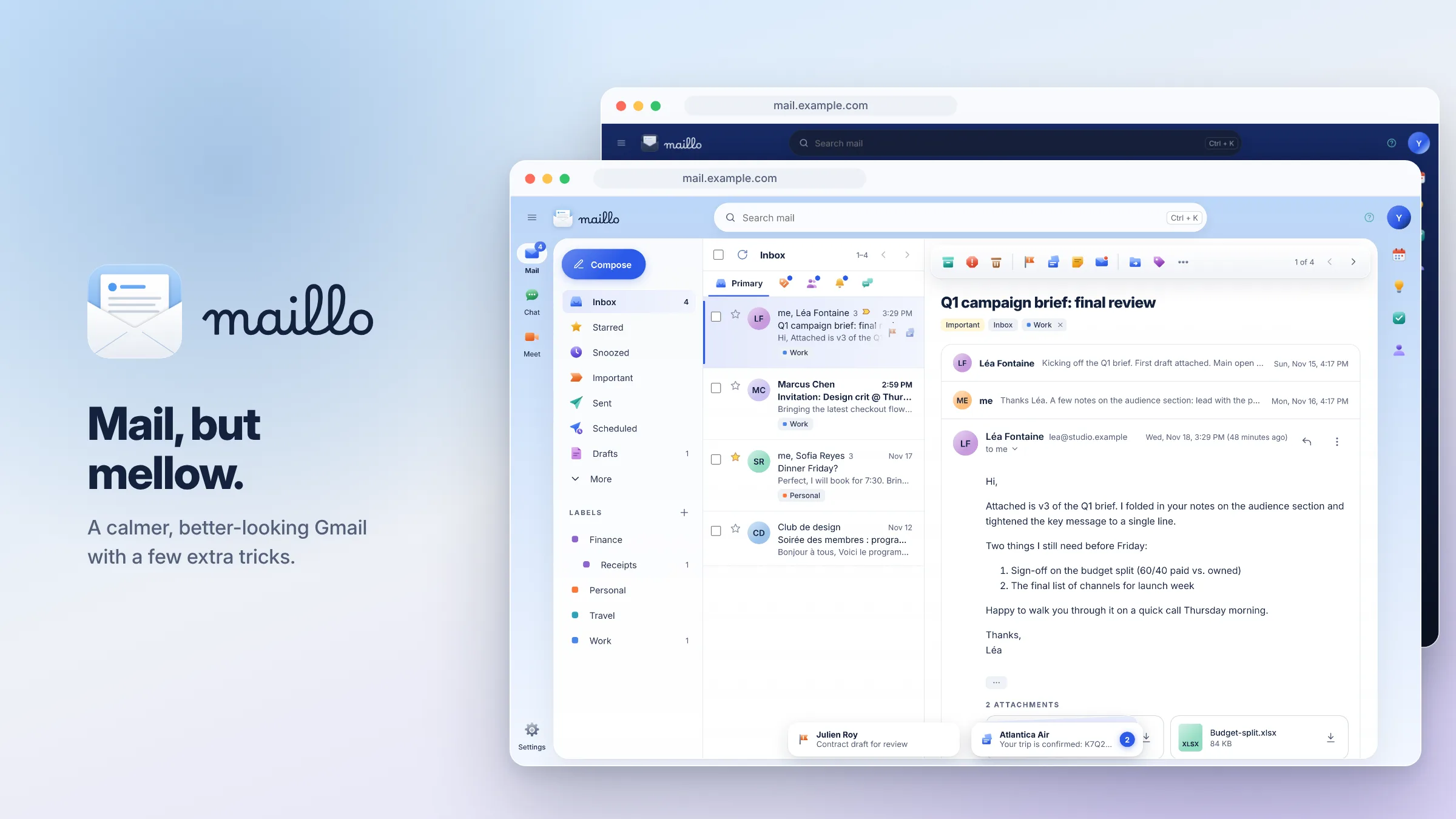
Maillo is a calmer, better-looking way to use Gmail. Same mailbox, same labels, same filters. A new face, and a few tricks Gmail never had.
Why I built this
I love Gmail. I just don’t love looking at it.
Under the hood, Gmail is hard to beat. The search is best in class, the spam filter is an invisible hero, and labels changed how I organize my emails, no, my life. But the web interface feels like it was designed by twelve committees who never met. Too many buttons, too little breathing room, and about 50 different shades of blue.
So I kept everything I like about Gmail and replaced the part I see every day.
Maillo is a new front end for the same mailbox. Your mail never leaves Google, your labels and filters work exactly as before, and you can switch back to Gmail anytime. Nothing breaks, because nothing moved.
What's in a name?
Maillo is mail plus mellow. That’s the whole brief: email that feels calm instead of urgent. Soft colours, room to breathe, and fewer things shouting for your attention.
The icon is an open envelope with a letter rising out of it, because good news should look like good news.
What's different?
Everything you’d expect from Gmail is there: categories, labels (nested and colour-coded), Gmail’s full search syntax, threads, drafts, undo send, filters, signatures and the vacation responder.
Here are some of the features Maillo adds.
- A calmer look. Frosted-glass panels, colour themes, and a real dark mode. Emails open in a clean reading view, with remote images blocked until you say so.
- Set aside. Not ready to deal with something, but don’t want it buried? Set it aside. It becomes a little card in a stack at the bottom of the screen. Fan the stack out when you’re ready.
- Action required. A second stack, right next to it, for mail you actually need to do something about. Both are plain Gmail labels, so they sync to your phone too.
- Private notes. Stick a note on any conversation, like “Paid on Nov 14” or “Waiting on Marc”. Only you see it, and it’s never sent.
- Optional extras. Today’s agenda from Google Calendar, Google Tasks in a side panel, and AI help through Gemini, with the key kept on your own server.
- Keyboard-friendly. Press ? to see every shortcut.
Coming soon: set it up for yourself
I’m still fine-tuning Maillo, but the plan is to make it free to run on your own web space. There will be no account to create with me and no server in the middle: you’ll upload a few files, connect them to Google, and you’re done. Setup should take about 20 minutes.
You’ll need:
- Somewhere to host a website with HTTPS, such as shared hosting (cPanel), Cloudflare Pages or Netlify
- An address for it, like mail.yourdomain.com
- A Gmail or Google Workspace account
Watch this page to find out when it’s available!
Good to know
Is my mail safe? Your mail stays in your Google account. Maillo talks to Gmail straight from your browser through Google’s official API. Nothing is copied to a server, your sign-in stays in your browser tab, and I never see any of it.
Do I lose anything from Gmail? No. Labels, filters, stars and drafts are all regular Gmail, so they show up the same in the Gmail app on your phone. You can use both side by side.
What can’t it do? A few things Google keeps for its own apps. You can’t create new snoozes or scheduled emails (the existing ones still show), and Delete forever needs Gmail itself. Trash empties on its own after 30 days anyway.
Does it cost anything? Maillo will be free. Hosting costs whatever you already pay, and Google’s side is free for personal use.
Do I need to know how to code? No, but you’ll need to be comfortable uploading files to a website and editing one settings file. If you’ve ever set up a WordPress site, you’ll be fine.
Make your inbox a little more mellow.
Maillo is a side project I use every day. Once it’s out and you’ve tried it, I’d love to hear what you think, what breaks, and what you’d add next.